I put an app on my home screen in a day — here are the six prompts
I built a to-do app and put it on my phone's home screen in a day — six prompts, start to finish. The surprising part wasn't that it worked. It's how loose the prompts were: typos, half-sentences, one that's just "what next?" — and that three of the six could be that sloppy because a system I'd built before the project carried the quality the words left out.
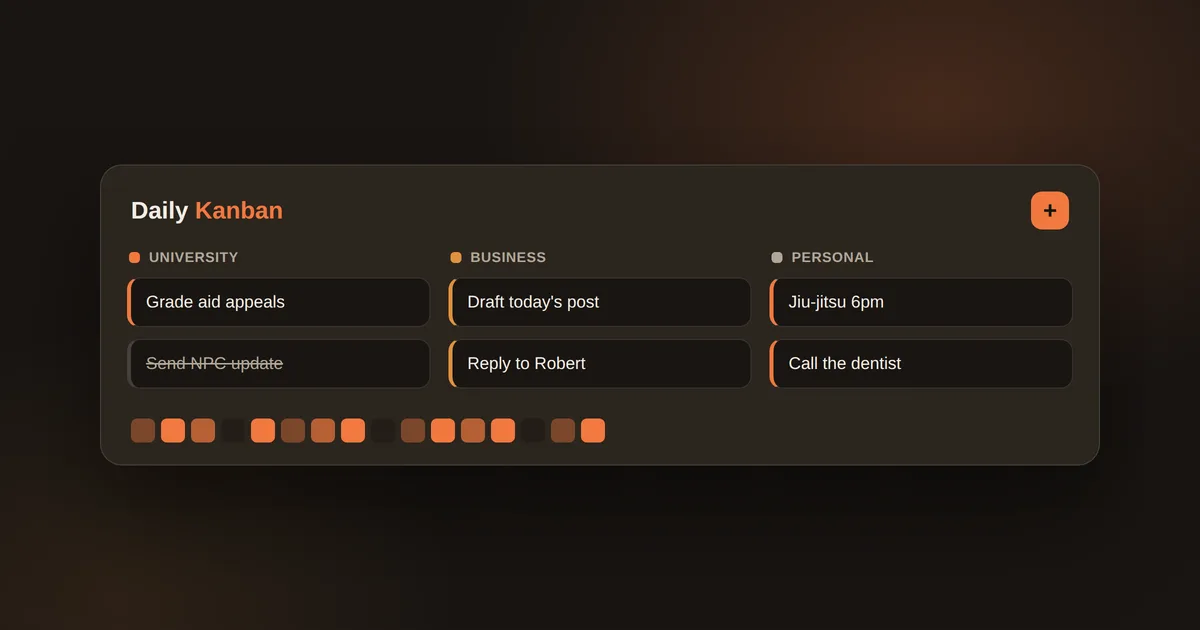
I have a to-do app on my phone's home screen. I built it in a day, and it works the way I actually think — my University tasks, my business, my personal stuff, three columns I swipe cards across.
The surprising part wasn't that I could build it. It was how loose the prompts were. Six of them, start to home screen — typos, half-sentences, one that's just "what next?" Nothing like the careful spec I used to think building with AI required.
Here are the actual six, unedited, with what each one really did underneath. The gap between how sloppy they are and what came back is the whole point.
The six prompts
1. "build a polished Kanban so that I can track daily to-dos. ill use this for everything; work at the univeristy, business at home, personal, etc. I should be able to add and edit notes to items. I also want a graph and data of the activity." → The one real build prompt — and look how loose it is. One run-on sentence, a typo, a hand-wave at the end ("a graph and data of the activity"). I named my three areas, sure, but I never explained what "business at home" is, or what that graph should actually be, or how any of it should be built. I didn't have to: the AI already had my context on file, so a sloppy sentence was enough to get a coherent app. It even turned that vague "graph and data" into a design that records every action as it happens — which is why the activity view is honest instead of guesswork — without me asking.
2. "this needs to be mobile first, since I will mainly be using it on my phone. the touches and the uix needs to be polished and validated to fit this. I want it fast and useful and beautiful." → Not a tweak — a full rework. And notice I said "validated" without ever saying validated how. I didn't need to: the standard was already written down in a design method I use — colorblind-safe colors, contrast checks, real rules. The word was mine; the bar was already on file. (It also kicked off a second round of the AI testing its own work — more on that below.)
3. "I merged to gh. what next?" → Not building — a handoff. The merge was mine to do ("gh" = GitHub, where the code lives); the AI just told me the next human step.
4. "give me the click by click on how to deploy, give me links if needed. I'm on my phone." → The human last mile. I gave it the one bit of context that mattered — "I'm on my phone" — so the steps came back phone-shaped instead of desktop instructions I'd have to translate. ("deploy" = put it on the internet at a real address.)
5. "deployed, its live on my phone now." → I confirm it's real; the AI verifies the live site — including checking that a private note returns "not found" — before we call it done.
6. "journal this and how it was built. include all prompts used." → This ran a skill I wrote myself — a reusable instruction set that records how a build happened, in my own format. It's the only reason I can show you these exact six prompts now: one of my own tools captured them as they happened.
The split that actually matters
Read those six back and there are two very different kinds of prompt.
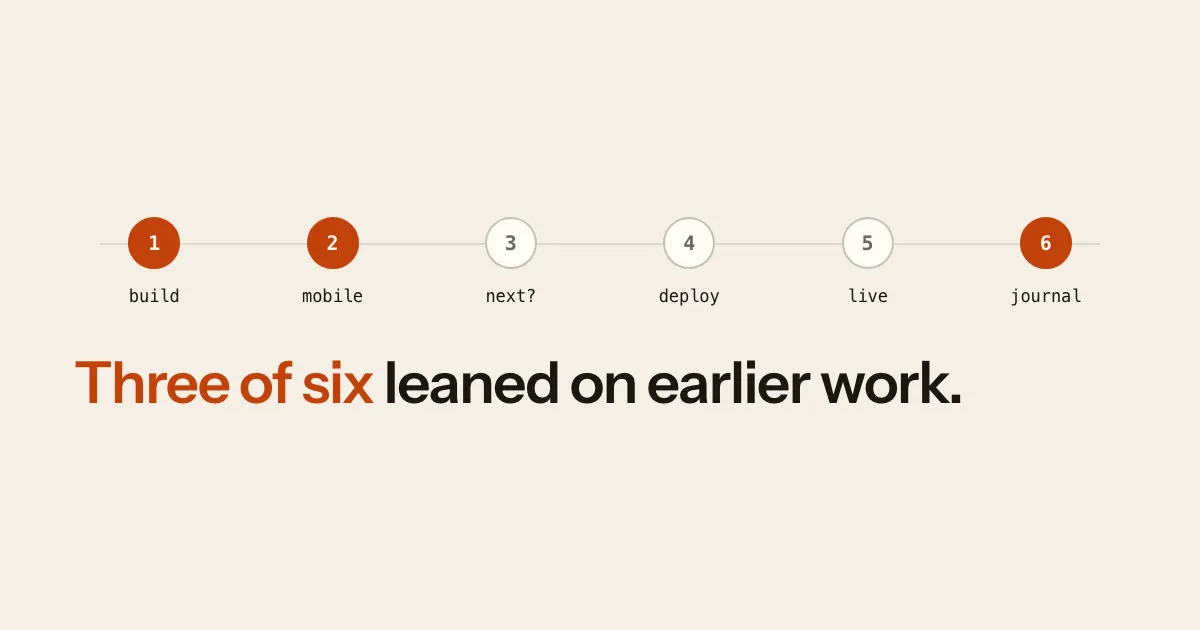
Three of them — 1, 2, and 6 — could be as short and sloppy as they are because a system I'd built before this project did the heavy lifting:
- 1 leaned on my context already being on file, so I never had to explain my life to get a coherent app out of one run-on sentence.
- 2 leaned on a design standard I'd written down once, so "validated" already meant something specific — I didn't have to spell it out.
- 6 ran a skill I built with my own hands.
The other three — 3, 4, and 5 — were just me, doing the parts only I can: I merged the code, I deployed from my phone, I confirmed it was live.
One of those human steps mattered more than it looks. This app lives inside my personal notes repo — my second brain, full of things I'd never put on the public internet. So before it went live, we set it up so only the app folder ever gets uploaded and served, and then tested that a private note returns "not found" on the live site before trusting it. That's not a call you let the AI make silently. That one's yours.
Why the prompts could be that loose
Here's the reframe I wish I'd had earlier. When I started with AI, I thought a good prompt was a precise blueprint — the more detail I stuffed in, the better the result. It's backwards. A good prompt is a clear outcome and an honest constraint. The precision lives in the system around the prompt — your context on file, your methods written down, your own tools — and you build that up over time, not in the session you're typing.
That's the real reason six sloppy prompts produced a polished app. Not clever wording. A system doing the work the words left out. (The "context on file" part is its own story — I wrote about that separately, in I stopped re-explaining myself to my AI.)
The one thing I add every single build
There's one more source of quality in that list, and it's not about my notes — it's a habit I'd never skip: I make the AI check its own work in a real browser.
After the first build, it drove the actual app — clicking, adding cards, dragging them to "done," hovering the charts — and caught bugs before I ever saw them: a crash in the quick-add box, ugly numbers on a chart axis. Fixed before the first save.
Then the mobile rework got its own round, this time faking finger-swipes and long-presses on a phone-sized screen. That caught three bugs that only happen on a phone: a tap that opened the edit sheet and instantly closed it again, tooltips that vanished the moment you lifted your finger, and date labels colliding in the small space. I'd never have found those by eyeballing it.
If you take one concrete thing from this: don't ask AI to write code, ask it to write code and then prove it works by running it. "Build it" and "build it and verify it in a browser" are two different instructions, and you get two different qualities of thing.
What one day actually bought me
Not a prototype I screenshotted and abandoned. A tool I've used every day since — and one I've kept reshaping in the weeks after, usually a prompt or two at a time. It even keeps an honest activity log: a GitHub-style heatmap of what I finished, streaks, completions by area.
So building with AI isn't about describing an app perfectly. It's the system you bring to the session — your context, your methods, your own tools — plus making the AI verify its own work, plus keeping your hands on the few parts that are really yours.
The prompts get short when that system does the heavy lifting. That's the actual skill, and it isn't the typing. Six sloppy prompts looked like the story. The system underneath three of them was the real one.
It's on my home screen. Yours can be too — and most of the work happens before you ever open the project.
Thanks for reading.